

Eight percent of the population has suffered from hearing loss
Read MoreAdults and children are commonly exposed to loud music. Between ear buds connected to iPods or MP3 players and music concerts, loud music can cause hearing loss.
The inner part of the ear contains tiny hair cells (nerve endings).
- The hair cells change sound into electric signals.
- Then nerves carry these signals to the brain, which recognizes sound.
- These tiny hair cells are easily damaged by loud sounds.
The human ear is like any other body part — too much use and it may become damaged.
Over time, repeated exposure to loud noise and music can cause hearing loss.
Decibels of Sound and Hearing Loss
The decibel is a unit to measure the level of sound.
- The softest sound that you can hear is 0 dB.
- Normal talking is 40 dB to 60 dB.
- A rock concert is between 110 dB and 120 dB, and can be as high as 140 dB in front of the speakers.
- Headphones are 110 dB.
The risk of damage to your hearing when listening to music depends on:
- How loud the music is
- How close you may be to speakers
- How long and how often you are exposed to loud music
- Headphone use
- Familyhistory of hearing loss
Jobs or activities that increase your chance of hearing loss music are:
- Being a musician, sound crew member, or recording engineer
- Working at a night club
- Attending concerts
- Using portable music devices with headphones
Children who play in school bands can be exposed to high decibel sounds, depending on which instruments they sit around.
When at a Concert
Rolled-up napkins or tissues do almost nothing to protect your ears at concerts.
Two types of earplugs are available to wear:
- Foam earplugs, offered at stores, help reduce noise. They will muffle sound and voices but can fit poorly.
- Custom-fit musician earplugs improve fit and do not change the sound quality.
Other tips while in music venues are:
- Sit at least 10 feet away from speakers, and it is best to sit even farther away
- Takebreaks in quieter areas. Limit your time around noise.
- Move around venues to find a quieter spot.
- Avoid having others shout in your ear to be heard. This can cause further harm to your ears.
- Avoid too much alcohol, which can make you unaware of the pain louder sounds can cause.
Rest your ears for 24 hours after noise exposure to give them a chance to recover.
How to Listen to Music on Your iPod or MP3 Player
The small ear bud style headphones (inserted into the ears) do not block outside sounds. Users tend to turn up the volume over other noise.
If you wear headphones, the volume is too loud if a person standing near you can hear the music coming through the headphones.
Other tips about headphones are:
- Decrease the amount of time you use headphones.
- Turn down the volume. Listening to music at level 5 or above for just 15 minutes per day may cause long-term hearing damage.
When to Call the Doctor
If you have ringing or “muffling” in your ears for more than 24 hours after exposure to loud music, get a hearing check-up.Have your hearing checked by an audiologist.
See your health care provider for signs of hearing loss if:
- Some sounds seem too loud
- It is easier to hear men’s voices than women’s voices
- You have trouble telling high-pitched sounds (such as “s” or “th”) from one another
- Other people’s voices sound mumbled or slurred
- You need to turn the television or radio up or down
- You have ringing or a full feeling in your ears
Alternate Names
Noise induced hearing loss – music; Sensory hearing loss – music
References
Arts HA. Sensorineural hearing loss in adults. In: Cummings CW, Flint PW, Haughey BH, et al, eds. Otolaryngology: Head & Neck Surgery. 5th ed. Philadelphia, Pa: Mosby Elsevier;2010:chap 149.
Noise-Induced Hearing Loss. National Institute on Deafness and Other Communication Disorders. NIH Pub. No. 97-4233. Updated: October 2008.
Update Date: 5/13/2012
Updated by: Linda J. Vorvick, MD, Medical Director and Director of Didactic Curriculum, MEDEX Northwest Division of Physician Assistant Studies, Department of Family Medicine, UW Medicine, School of Medicine, University of Washington. Also reviewed by David Zieve, MD, MHA, Medical Director, A.D.A.M. Health Solutions, Ebix, Inc.
From: NIH.GOV Med line
Online hearing aid stores save you money
Read More28 million Americans suffer from hearing impairment
Read More
Not being able to hear to your full capacity can be a crippling and irritating thing that can hold you back from living life to the fullest. It is important to look into being fitted for aids for hearing so that you can hear again and get back to life.
Once you being looking into the cost of hearing aids, you will be surprised at how they are affordable. An audiologist will give you a hearing test and fit you for the best hearing aid device to meet your needs. They will ensure that you will begin hearing sounds more easily. The hearing test that you will take will give the audiologist an idea of what percentage you are able to hear. This will allow them to create a hearing aid device that will greatly increase your hearing.
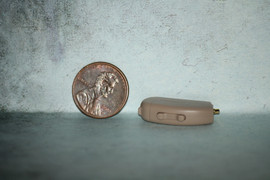
These aids for hearing are now designed so that they are small and unnoticeable. This will allow you to hear to your fullest without being self-conscious of your hearing aid device. It is important to being looking into aids for hearing if you suspect that you have hearing loss. The cost of hearing aids are affordable, and they will be worth every penny spent so that you can hear again.
Loss of hearing is usually a gradual process as one or both ears become unable to hear sounds clearly. This is commonly due to the degeneration of hair cells or a malfunction to the tiny bones of the inner ear.
When you find yourself needing to buy hearing aids for the very first time, the experience can be overwhelming. The best hearing aids are not always the recommended choice of an audiologist that could be representing a particular firm that wants you to buy hearing aids from them.
Ask for a copy of your test results and get a second opinion before shopping for the best hearing aids. Digital hearing aids have come a long way since first introduced and you may find the improved technology just what you need in finding the right adjustment.
Most companies that have state of the art digital hearing aids can recommend a hearing center for a second opinion. The choice to buy hearing aids is one that should not be taken lightly. Only the best hearing aids by reputable companies should be considered.
When fitted with an incompatible hearing device, you will not appreciate sound at its finest. Take your time so you are completely satisfied with your choice.
Trimmers Adjustment
To adjust the controls, use a very small 3/64″ jeweler’s screwdriver. You can buy jeweler’s screwdriver sets ($10?) at stores like Radio Shack or many drugstores, usually a blue plastic box with a clear folding lid. Buy a jeweler’s magnifier loupe ($10?) at the same time so you can see the tiny labels identifying the controls– 4x isn’t enough for me, even 10x only barely enables me to read them.
First clean your ear canal of wax (cerumen). Do this at your own risk (doctors recommend against this), but I use Q-Tips very carefully, twisting them continuously as I insert them and as I pull them out. Absolutely never force the Q-Tip!! Or push it in to where it causes discomfort! Always do this yourself, never have someone else do it, because you yourself can feel any discomfort, and you probably will hear the increased rubbing sound when the Q-Tip is near your ear-drum letting you know when to quit, when the Q-Tip is “at the bottom”. Always control the Q-Tip yourself, NEVER have someone else control the Q-Tip (unless that person is a doctor or nurse of course).
Then trim the hair from your ear canal, it may help your hearing and the fitting of the Open Ear Tip into the canal, and it may also help reduce itching irritation. You can buy these completely safe $10- $20 rotating trimmers made for the purpose, spend some time inserting the trimmer many times into each ear, as they tend to bend many hairs down rather than cutting them, cutting only a few hairs on each insertion, but doing many insertions will get most of the hairs.
The door protecting the controls is between the volume rocker switch and the mode push-button. The door swings open on a hinge at mode push-button end. Open the door exposing the controls by gently inserting the screwdriver tip into the tiny slot hole near the plus end of the volume rocker switch and gently prying upward. The little door will swing open on its hinge which is at its end at the mode push-button.
Don’t ever adjust any control (here or elsewhere in your life) to the extreme end of its range either clockwise or counter-clockwise. Controls sometimes malfunction if put at their extreme end positions. Leave all controls always between the 5% and 95% positions.
You’ll have to try various settings over several weeks to get them the way you want them. But here is my approach to the initial trial setting.
The NH Low Frequency control is at the top, nearest the mode push-button. Most people like me have high frequency roll-off hearing loss and don’t need low frequency amplification. I need low frequencies to be just passed through at normal level, so for my initial setting I first gently turn this control through its full range so I know where its end positions are, then put it to its counter-clockwise end position, then turn it clockwise to about 1/3 of the way toward its clockwise end– on mine this is at about the 10 o’clock position.
The MPO AGC Automatic Gain Control is at the bottom, nearest the volume rocker switch. This control reduces the loudness of loud sounds down toward the loudness of normal sounds. One of my hearing problems just without hearing aids is loud sounds are too loud. Also the biggest problem I’ve had trying other people’s hearing aids is that loud sounds are much too loud. So I want loud sounds reduced as much as possible down toward normal loudness. The most reduction in loud sounds is at the maximum counter-clockwise position. So gently turn this control through its entire range to learn where its end positions are, then turn to its counter-clockwise end, then turn it clockwise just a tiny bit to just a small amount, 5%, toward its clockwise end. On mine this is at about the 7:30 o’clock position.
The G Gain Control is the left control, at middle between the loudness rocker switch and the mode push-button. This control adjusts loudness.
An explanation is needed:
1- The “outside” main rocker loudness switch has about eight steps between maximum and minimum loudness, and increases or decreases by one step whenever you press the up or down ends of the loudness rocker switch.
2- Whenever you turn your hearing aid on by rotating the battery into closed position, your loudness is automatically set to the middle of the eight steps.
3- You need to adjust the Gain Control screw so that, whenever you turn your hearing aid on by putting in the battery, it turns on at your normal preferred loudness setting.
So before adjusting the G Gain Control screw, first turn the hearing aid off by rotating its battery fully out, count to 10, and then turn the hearing aid back on by pushing the battery in, so its rocker loudness switch is at its automatic middle position.
Now by trial and error, adjust the left-side (middle-up-and-down, see trimmer’s picture) G Gain screw until loudness is what you want for normal use. Try it under different listening sound conditions, listening to different sounds. For testing I used the TV or the car radio. I try it at different television volume settings. It’s very important to try it also with different added background noises, like strong wind or a fan or road noise in a car at highway speeds, because such background noise reduces our ability to hear far more than most people realize.
For me, I adjusted the G Gain screw so that I could just almost tell that it was on, sort of just below where I could barely tell it was on, but high enough that I could hear a difference when I put it on. I can clearly tell it is on if I talk into my hand with my hand cupped toward that side. This initial attempt to adjust the G Gain screw put it at about 12 o’clock for me.
Readjust No. 1: After using it a bit, I found the high frequencies in my left ear, like “tinny” noises, were too loud. So I adjusted the left ear NH Low Frequency screw (at the top, next to the telephone button) a bit higher, to about the 12 o’clock position, thereby moving the total or center of the amplified sounds toward the low frequencies and away from the high frequencies, and readjusted the G Gain screw down from about 12 o’clock to 11 o’clock. And so far this seems about right.
Readjust No. 2: High frequencies in left ear (rattling newspaper pages) are still too loud, so I adjusted the left ear NH Low Frequency (top) screw higher to 2 o’clock, and the G Gain (left side) screw lower to 10 o’clock. This seems about right.
My left is now: NH= 65% 2 o’clock, G= 35% 10 o’clock, AGC= 5% 6:30 o’clock
My right is now: NH= 35% 10 o’clock, G= 50% 12 o’clock, AGC= 5% 6:30 o’clock
Doctor Paul
Hear-Better.Com
This article was originally written by “dabunting” and modified by Doctor Paul
CW = Clockwise CCW = Counter Clockwise
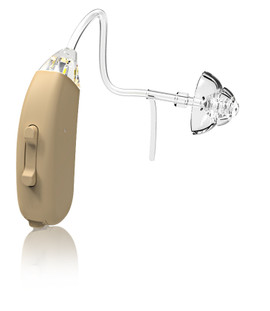
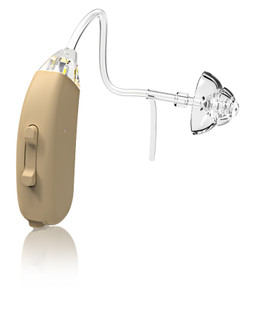
Sometimes it can be challenging to using a phone with a BTE hearing aid in place but it can be as easy as 1.2.3.
1. Hold your phone to your ear like usual. If you have an open-mold fitting BTE hearing aid your finished, your ear canal isn’t blocked and hearing on the phone should be easy.
2. Tilt the phone receiver up a little toward the top of your ear. Your hearing aid has microphones usually on the top of the hearing aid to pick up sound and bring it into your ear. Getting the best use out of the microphones on your hearing aid will increase the amplification of the voice coming through the phone and makes hearing easier.
3. Pull your ear mold out just a little bit before placing the phone to your ear. With BTE hearing aids with little soft bud, dome, or foam piece inside your ear pulling them out just enough to loosen it up inside your ear allows more sound into your ear. When finished talking on the phone remember to push your ear bud back down into your ear canal.